Inspired by a few comments and suggestions from my loyal team of Beta Testers (or NTRQ Disciples as they’re known in some circles). Look, see!
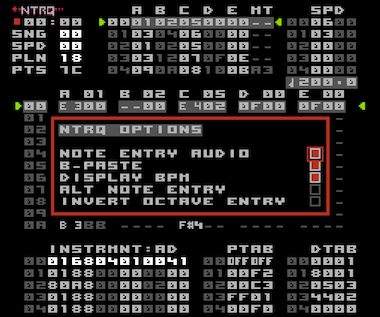
Note Entry Audio
Is to turn on/off audio when entering notes. Hearing notes as you enter them is a good thing, most of the time. Pretty straight forward I guess.
B-Paste
Button B is normally the “delete” or “erase” key but if you press it on an empty Pattern cell (y’all probably know this because even though I thought I was really clever when I “invented” it, apparently LSDJ does the same) the last value that you deleted is pasted into the empty cell. The only downside to this feature is that if you’re deleting values with abandon, it’s easy to end up pasting values in where you don’t want them. This option disables that feature and allows frantic deleting.
Display BPM
Something new I added (which, once again, is apparently taken from LSDJ) is a feature to calculate and display the current BPM of the playing Song. This option enables/disables that feature.
Alt Note Entry
Default note entry uses U/D to set the semi-tone value and L/R to set the octave number. Enabling this option switches those around. Probably stolen from LSDJ again, sorry Johan.
Invert Octave Entry
Default octave entry/modification of a note uses L to decrease the octave number and R to increase it. This option switches it the other way about.
Back to bug-fixing and manual-(re)editing!
Neil
 Twitter
 email
Don’t sell yourself short! These are all pretty awesome improvements, and you can’t attribute features as basic as displaying BPM to someone else’s work. NTRQ/LSDJ comparisons are bound to happen given the basic similarities, but I find the work-flow in yours makes for a very different kind of monster. You’ve got a great program here, and I’m glad I’ve had the opportunity to use it!